
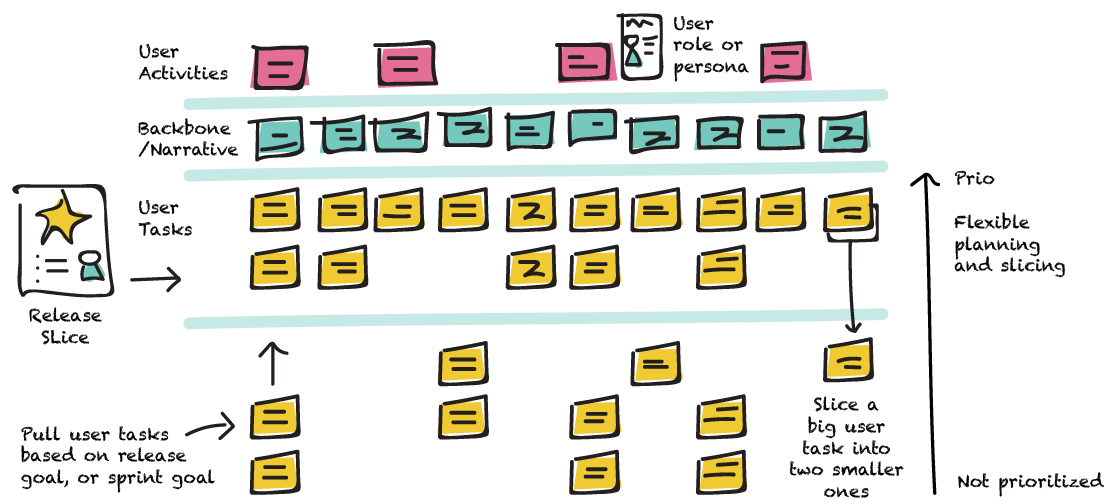

Most backlogs hide the real product story.

User Story Mapping
Training

User Story Mapping reveals the full journey so teams can prioritize smarter and deliver value faster.

INFO

Beginner

1 day

online or at your office

About

In a nutshell

What is this training actually about?

User Story Mapping is about bringing structure and clarity to product delivery. Many teams manage backlogs as flat lists of features. As complexity grows, alignment weakens, priorities blur, and delivery loses focus.

Teams work hard – but the big picture becomes unclear. So, teams need to learn how to:

  • visualize the entire product journey from the user’s perspective
  • organize work around user activities, not isolated features
  • identify missing functionality and hidden dependencies
  • structure delivery into meaningful, incremental releases
  • align teams and stakeholders around shared goals

The goal is not to create another artifact. The goal is to create shared understanding, visible priorities, and a logical path from idea to release.

Common situations

when this training is needed

When backlogs grow but product direction becomes unclear

Work accumulates, but the overall product journey is hard to see.

When teams deliver features but struggle to explain the bigger picture

Stakeholders see tasks completed, but not how they connect to real user value.

When priorities constantly change without clear structure

Everything feels important, yet teams lack a shared way to organize delivery.

When teams focus on individual stories instead of the user journey

Features are built, but the user experience remains fragmented.

When releases feel chaotic rather than intentional

Work gets done, but delivery phases are not clearly structured.

When stakeholders struggle to align on what should come next

Discussions revolve around opinions instead of a visible product flow.

When teams want better visibility of progress across the product

Work is happening, but it’s hard to see where the product actually stands.

When teams need alignment without adding more process overhead

You need clarity and shared understanding - not more complexity.

Benefits for the team

What improvements can the team expect

Clearer product vision

Teams understand the full user journey and how individual features contribute to the product.

Better prioritization decisions

Work is organized around meaningful user activities, not just isolated tasks.

Improved stakeholder alignment

Everyone can see the same product story, making discussions about priorities easier and more productive.

More structured release planning

Teams can break large ideas into meaningful delivery phases.

Higher transparency of work

Progress becomes visible across the product, not just inside the backlog.

Stronger collaboration across roles

Product owners, developers, designers, and stakeholders collaborate around the same shared product view.

More focused product discussions

Conversations shift from “what feature next” to “what problem are we solving for the user”.

Reduced rework and confusion

Clear structure prevents building disconnected features that later need rework.

Greater team engagement

Teams see how their work contributes to real product outcomes.

Learning objectives

Review the learning outcomes and agenda to evaluate whether this training fits your team’s needs.

• What User Story Mapping is and why teams use it
• The difference between a flat backlog and a story map
• How story mapping helps teams understand the product as a whole
• When User Story Mapping is the right technique to use

What to expect

Training format and details

FORMAT

Online or onsite – depending on team needs

DURATION

1 day

WHO IS IT FOR

Product managers, Product Owners, project managers, business analysts, startup owners, UX designers, product designers, Scrum Masters - essentially anyone involved in shaping what gets built and in what order.

FAQ

FAQ

User Story Mapping is a technique that helps teams visualize the entire product journey from the user’s perspective – not as a flat list of features, but as a structured map of user activities, tasks, and release slices. It brings shared understanding to the whole team and makes prioritization decisions visible and logical.

Need help with anything?
Drop Us a Message